
How do I login?Updated 2 months ago
With our passwordless login, you can login with just your account email! No password necessary.
Here's how it works:
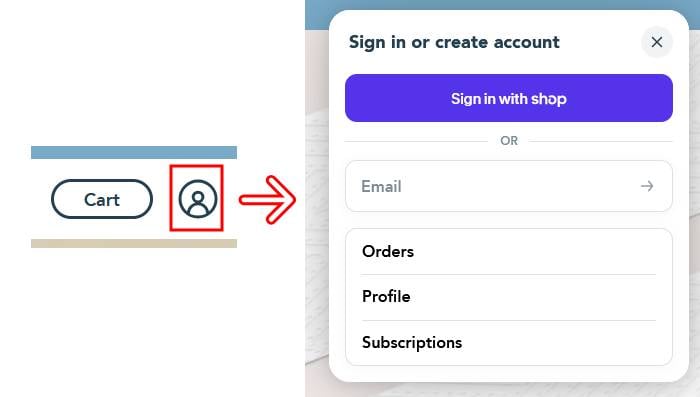
Step 1: Click on the "account" icon at the top right of the screen and enter your email address. For direct page access, click on the page you want to go to.
You can also click here to be directly taken to the login page
- on mobile, click on the menu icon at the top left of the screen, then on the "Account" link
- if you use the Shop App, you can sign in using that by clicking the "Sign in with Shop" button
Update: this login will no longer send a 4 digit SMS code to your cell phone. To continue using that login/feature, please login directly using this link
Step 2: Enter the code you received via email
- this will send a 6 digit code to your email
- if you don't see the email in your inbox, please check any spam or promotions-type folders you may have
Step 3: You're now logged in and will be redirected to the homepage. Click again on the "account" icon and select the page you want to go to
No account found? Please make sure you're entering your account email address. If that still doesn't work, please clear your browser cookies and try again or try on a completely different browser and device.